Install jenkins on docker container for running php applications
Simplified Jenkins Setup for PHP Projects using Docker and Docker Compose
Setting Up Jenkins in Docker for Centos: Fetching from GitHub and Deploying to PHP Server
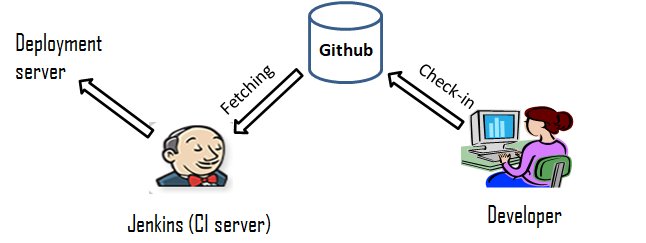
In this blog post, we'll explore how to deploy your code from a GitHub repository to a live PHP server using Jenkins running within a Docker container on a Centos machine. This setup offers portability, consistency, and automation for your deployment process.
Prerequisites:
- Centos machine with Docker and Docker Compose installed
- GitHub repository containing your code
- Basic understanding of Docker and Jenkins
System Setup:
-
Directory Permissions: Ensure the following directory permissions are set as mentioned:
/var/www/docker/jenkins:0755(apache:apache)
/var/www/html/php:0755(apache:apache)
-
docker-compose.yml: Create a
docker-compose.ymlfile with the following content:
version: '3.8'
services:
  jenkins:
    image: jenkins/jenkins:lts
    user: jenkins
    ports:
      - 8080:8080
    restart: always
    container_name: jenkins
    volumes:
      - /var/www/docker/jenkins:/var/jenkins_home
      - /var/www/html/php:/var/www/html/php # Mount PHP server directory
- Start Jenkins: Run
docker-compose up -dto start the Jenkins container.
Jenkins Configuration:
- Access Jenkins Interface: Open your web browser and navigate to
http://localhost:8080.
- Initial Setup: Follow the on-screen instructions to complete the initial Jenkins setup.
- Install Plugins: Install the necessary plugins, such as "Git" and "Publish Over SSH."
- Create Job:
- Job Type: Freestyle Project
- Git Repository: Configure the URL of your GitHub repository.
- Build Steps: Add a "Shell Script" build step with the following content:
#!/bin/bash
remote_dir="/var/www/html/php/ommsoev2_live/"
cp -r "${WORKSPACE}"/* "$remote_dir"
- Configure Credentials: Add SSH credentials for authorized access to your live server.
Deployment Process:
- Trigger Build: Push code changes to your GitHub repository. This will automatically trigger a Jenkins build.
- Build Execution: Jenkins fetches changes from GitHub, executes the build script (copying files to the PHP server directory), and deploys the updated code to your live site.
Security Considerations:
- Avoid using
privilegedmode in the Docker container unless absolutely necessary.
- Store SSH credentials securely using Jenkins credential management.
- Implement proper access control for Jenkins and the live server.
By utilizing Docker and Jenkins in this way, you can achieve an efficient and automated deployment pipeline for your Centos-based PHP application. Remember to adapt and enhance this setup based on your specific project requirements and security best practices.
What's Your Reaction?